
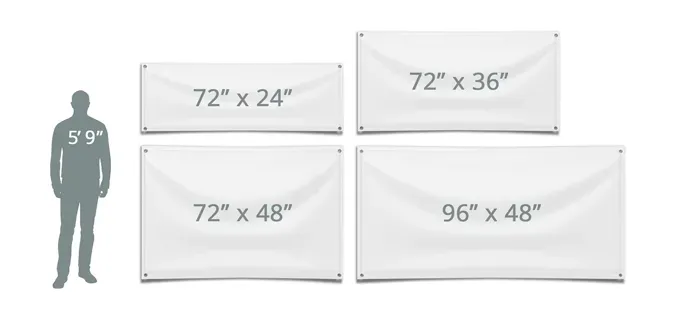
Custom banner sizes shape how your message travels from screen to street, influencing readability, attention, and budget. Understanding banner dimensions helps you balance viewing distance with content density across storefronts, trade shows, and conference spaces. For flexible setups like roll-up banner dimensions, you can adapt height and width to fit stands and backdrops without compromising legibility. Knowing standard banner sizes and banner size guidelines ensures your design scales cleanly from small promos to large exterior signage. When you design with print banner sizes in mind, you optimize for print resolution, bleed, and transport, keeping production costs in check.
Beyond numeric labels, think in terms of display measurements and how distance, lighting, and viewer position shape your banner strategy. Different signage formats—from window graphics to portable stands—require varying display dimensions and layout approaches that preserve readability. The same design rules for contrast, typographic scale, and visual hierarchy apply across sizes, from compact promos to large exterior backdrops. For teams preparing production-ready files, aligning artwork with the intended print workflow and finish options helps ensure consistent results. In practice, thinking in scalable concepts lets you reuse core artwork and still tailor it to each display context.
Understanding Banner Dimensions for Effective Visual Impact
Understanding banner dimensions sets the foundation for readability and impact. When you craft messages for storefronts, trade shows, or other display spaces, knowing the exact banner dimensions helps determine line length, font size, and the required resolution. For practical planning, also consider print banner sizes offered by printers and how those sizes map to your display goals.
In practice, align your design with standard banner sizes used in venues and across regions. Use banner size guidelines to choose an initial size, then test legibility from typical viewing distances. Keep in mind that even common banner dimensions can vary slightly by vendor, so confirm final dims before production.
Roll-Up Banner Dimensions: Choosing the Right Width and Height
Roll-up banners focus on portability and quick setup. The most common widths are 33 inches or 36 inches, with heights typically 78 to 85 inches. These roll-up banner dimensions balance readability at a distance with a compact footprint, making them ideal for events and conferences.
When choosing a roll-up, consider your stand system and content density. Some models offer taller frames that reach eye level, while others stay shorter for tabletop displays. Check your vendor’s spec sheet for exact roll-up banner sizes and safe margins to avoid cropping content during printing and display.
Custom banner sizes: When to Go Larger or Smaller
Custom banner sizes unlock flexibility for unique venues or branding needs. If your display space is irregular or you want a multi-panel composition, opting for custom banner sizes can improve impact and legibility. This approach is often guided by banner size guidelines to ensure the final product looks balanced across distances.
Before committing, map your audience distance, lighting, and wall or stand dimensions. Use your knowledge of standard banner sizes as a baseline, then adjust width, height, and aspect ratio to preserve a strong visual hierarchy. Ensure your printer can accommodate bleed and resolution for the chosen custom sizes, and confirm compatibility with print banner sizes from your supplier.
Design and Readability: How Size Affects Legibility
A banner’s size dictates how quickly and easily viewers can absorb information. From near to far, ensure headlines are legible at the expected vantage point by selecting appropriate font sizes and line lengths. This is where banner size guidelines help balance contrast, typography, and visual hierarchy.
Test at actual viewing distances, not just on screen. Larger banners benefit from high-contrast color palettes and simpler messaging. Even standard banner sizes can fail if typography isn’t scaled for distance, so design with the end user and venue in mind.
Practical Sizing by Venue: From Storefronts to Trade Shows
Different venues demand different banner sizes. Storefront signage may use smaller banners, while trade shows often benefit from wider displays that fill a booth. Refer to print banner sizes that are commonly available in your region to speed up procurement and ensure consistent print quality.
Measure the space, consider traffic flow, and plan for mounting methods. Whether you’re mounting on glass, walls, or stands, align the final dimensions with your audience’s line of sight and the exhibition layout. Using standard banner sizes as a baseline helps you stay compatible with event guidelines.
Workflow and Production Considerations for Multi-Size Campaigns
Effective campaigns start with a master design at the largest size you expect, then scale for smaller formats, preserving the aspect ratio. This workflow minimizes content misalignment across banner dimensions and ensures consistent branding across all sizes.
Plan for bleed, safe margins, and material choice by size. If you’re using roll-up banners, design within the stand width and allow for hardware area. When preparing for multiple sizes, reference standard banner sizes and print banner sizes to ensure your files are print-ready and scalable, paying special attention to roll-up banner dimensions during production.
Frequently Asked Questions
How do I determine the right custom banner sizes for storefront signage?
Choosing custom banner sizes affects readability, visual impact, and budget. Consider viewing distance, available wall or window space, and how much content you need to convey. Use banner size guidelines to pick widths and heights that preserve legibility, and compare with standard banner sizes to ensure your design scales across multiple formats. Also plan for printing resolution and bleed.
What are the typical roll-up banner dimensions for events, and how do they fit with custom banner sizes?
Roll-up banners typically come in fixed widths of 33 inches (85 cm) or 36 inches (90 cm) and heights around 78–85 inches (200–216 cm). When using custom banner sizes, treat these as starting points and design so important content stays within the safe area of the stand. This aligns with planning for print banner sizes and ensures readable results in events.
Why should I consider standard banner sizes alongside custom banner sizes for a trade show?
Standard banner sizes give predictable printing, consistent mounting, and lower costs, making it easier to plan for a trade show. However, custom banner sizes let you tailor to your booth and venue. Use banner size guidelines to compare options and pick a size that fits the space while preserving readability.
How do print banner sizes and bleed impact banner dimensions for indoor vs outdoor use?
Print banner sizes determine resolution: design at 300 DPI for smaller-to-medium banners and at least 150 DPI for very large banners viewed from a distance. Bleed is typically 1/8 inch (3 mm) per side. Apply these rules to custom banner sizes and always include safe margins to prevent clipping during trimming.
What design tips help readability across different banner sizes when using custom banner sizes?
To maximize readability across banner sizes, choose legible typefaces and bold headlines, and maintain a clear visual hierarchy (headline, subhead, call to action). Use high-contrast colors and avoid crowding near edges, especially when adapting to multiple sizes within your custom banner sizes. Test at different scales to ensure consistent impact.
What workflow helps create multiple sizes from a master design when using print banner sizes?
Design workflow: start with a master design at the largest size you expect (for example, a 6 x 10 ft vinyl banner) and scale down while preserving aspect ratio. Create separate version files for standard sizes (e.g., 33 x 80 inches, 34 x 85 inches) and for your other custom banner sizes. Include bleed and safe margins in each file to ensure clean trimming across the print banner sizes.
| Aspect | Key Points | Notes / Examples | |
|---|---|---|---|
| Why size matters in banner design | – Size affects readability and impact; distance matters. – Balance between viewing distance, information quantity, and visual hierarchy. – Practical constraints: printing costs, material, transport. | For best results, plan with responsive / custom banner sizes in mind to fit your venue and budget. | |
| Common banner sizes by use | Categories and rough dimensions to quick-shortlist options. | Small storefront/window banners: 24 x 48 in (61 x 122 cm); 30 x 60 in (76 x 152 cm) • Medium banners: 2 x 4 ft (24 x 48 in / 61 x 122 cm); 3 x 5 ft (36 x 60 in / 91 x 152 cm); 3 x 6 ft (36 x 72 in / 91 x 183 cm) • Large banners: 4 x 6 ft (48 x 72 in / 122 x 183 cm); 5 x 8 ft (60 x 96 in / 152 x 244 cm); 6 x 10 ft (72 x 120 in / 183 x 305 cm) • Roll-up banners: typical widths 33 in (85 cm) or 36 in (90 cm); heights ~78–85 in (198–216 cm); typical sizes 33 x 80 in (85 x 200 cm) or 34 x 85 in (86 x 216 cm).”}]} ,{ | Note: exact sizes vary by region and supplier; ensure high enough resolution for distance viewing and adjust to stand height. |
| Understanding print and bleed | – Resolution matters: design at 300 DPI for small-to-medium banners; at least 150 DPI for very large banners viewed from distance. – Bleed: typically 1/8 inch (3 mm) on each side. | Bleed ensures edge-to-edge printing; check printer specs and crop marks. | |
| Choosing the right size for your venue | – Viewing distance and space constraints drive size. – Consider content density, lighting, and background for legibility. – Plan for transport/setup and mounting needs. | Measure spaces carefully, anticipate lighting conditions, and choose sizes that balance message with space. | |
| How to adapt your design to different sizes | – Typography: legible sans-serif, bold weights for headlines. – Layout: single clear message on small banners; strong hierarchy on larger banners. – Visuals: high-contrast imagery; beware edge cropping. – Color: high contrast and brand-consistent. | Design once at a master size and scale down, preserving aspect ratio; test at standard sizes. | |
| Practical tips for roll-up banners | – Safe margins around text/logos. – Folding/packaging considerations to avoid overlapping content. – Material finishes: matte to reduce glare; glossy for color vibrancy. – Durability for outdoors or frequent transport. | Roll-up dimensions are influenced by stand; common widths 33–36 in; height ~78–85 in. | |
| Design workflow for multiple sizes | – Start with a master design at the largest anticipated size. – Scale down while preserving aspect ratio. – Create separate version files for standard sizes (e.g., 33 in, 36 in, etc.). – Save templates and test readability at distance. | Maintain a single source of truth for typography, color, and imagery across sizes. |